A transition in a multiplayer prototype of mine needs two people at two keyboards to test at all: sign in, host a lobby, join from a second process, walk a character to a cube, and press a key, once per player. Twice, in two separate iterations, that requirement is exactly what let a bug through for a while — not the same bug either time. The first time, the host moved on to the next map and the client silently didn’t come with it, disconnected rather than lagging, and the fix for that went in without anyone actually reconnecting a second player to check it worked. The second time, a menu stopped opening at all after that same kind of transition; an earlier check had confirmed a related claim about it — that its state doesn’t carry across — without ever asking whether the menu could still open afterward, and that narrower-than-it-looked check was the only record of what had actually been verified.
PostThe first travel is hard, and every one after it is seamlessPressing Create Room gave a black screen with nothing listening. Fixing that dropped every client on the next map change. The fix is deciding hard vs seamless per ServerTravel call, and the harder lesson was almost deleting that fix entirely.This post is about the command-line pipeline I built afterward, so both kinds of gap get smaller: generating the project without the Launcher, editing levels without opening the editor, packaging for two platforms, and finally driving the game itself so the same host-and-join flow runs unattended.
Generating a project without the Launcher
A small generation script builds a fresh project from the TP_ThirdPerson C++ template, the way the Epic Games Launcher would if you pointed it at the same template and typed a project name. Most of that is a straightforward copy-and-rename: move the template’s source folder into one named after the new project, rename every file that matches, and rewrite the template’s class prefix throughout .cpp, .h, .ini and .cs files.
Two steps are not a plain copy-and-rename, and skipping either produces a project that builds and opens while being broken at runtime:
- Shared content packs mount at
Content/<PackName>/, not atContent/itself. The template’s floor and character meshes live in packs likeCharacters,LevelPrototypingandInput, referenced as/Game/<PackName>/.... Flattening them intoContent/directly detaches every one of those references — the level loses its floor, the character loses its mesh. .uassetfiles bake in/Script/TP_ThirdPerson.*class references. Rewriting them in place would corrupt the asset’s name table, so the fix goes through config instead —[CoreRedirects]entries inDefaultEngine.inithat remap the old class and package paths to the renamed ones:
[CoreRedirects]
+ClassRedirects=(OldName="/Script/TP_ThirdPerson.TP_ThirdPersonCharacter",NewName="/Script/YourProject.YourProjectCharacter")
+ClassRedirects=(OldName="/Script/TP_ThirdPerson.TP_ThirdPersonGameMode",NewName="/Script/YourProject.YourProjectGameMode")
+ClassRedirects=(OldName="/Script/TP_ThirdPerson.TP_ThirdPersonPlayerController",NewName="/Script/YourProject.YourProjectPlayerController")
+PackageRedirects=(OldName="/Script/TP_ThirdPerson",NewName="/Script/YourProject")
Even after the rename lands, one more thing is wrong: the level’s World Settings still override the project’s GlobalDefaultGameMode with a Blueprint from the template. A follow-up script points it at the C++ GameMode instead — verified with a small script that reports which GameMode a level actually uses, rather than by reading config, since World Settings wins regardless of what DefaultEngine.ini says.
Editing levels without opening the editor
Every level-editing script in the project runs through the editor’s own Python integration rather than a session with a mouse in it:
UnrealEditor-Cmd <project> -run=pythonscript -script=<path-to-script>.pyThe scripts lean on LevelEditorSubsystem for the parts that would otherwise mean clicking through menus. new_level creates a level from nothing:
editor = unreal.get_editor_subsystem(unreal.LevelEditorSubsystem)
editor.new_level(LEVEL_PATH, is_partitioned_world=False)
unreal.get_editor_subsystem(unreal.EditorActorSubsystem) spawns actors into it — a directional light for a transition map, the parking spot between two real levels that travel passes through so the engine never has to hold two worlds in memory at once, or a floor and a PlayerStart for a waiting room:
light = actor_subsystem.spawn_actor_from_class(
    unreal.DirectionalLight, unreal.Vector(0.0, 0.0, 500.0),
    unreal.Rotator(-45.0, 0.0, 0.0))
World Settings — the GameMode override mentioned above — comes from the editor world’s get_world_settings(), read and written through get_editor_property / set_editor_property like any other Unreal object property.
One thing about this setup is easy to trip over: UnrealEditor-Cmd only forwards warnings and errors to its own stdout by default. Everything these scripts report goes through unreal.log(), which writes at Display verbosity — and Display doesn’t reach stdout unless the invocation also carries -stdout -FullStdOutLogOutput. Without those two flags, a script whose entire job is to report a result runs, exits 0, and prints nothing on the terminal, which looks exactly like a script that ran and found nothing wrong. Both flags are baked into the one wrapper that runs everything in the tools directory, for exactly that reason.
Packaging Windows from a Mac
A package script cooks and stages a build locally, and a remote build script does the same thing against a Windows machine over SSH — the far side of a build that Unreal simply cannot cross-compile. macOS has no toolchain for producing a Windows binary, so a Windows package has to be built on Windows, and the remote script is the one command that keeps that from meaning a second machine to sit in front of: it sends the working tree over tar and SSH, runs the Windows equivalent of the package script there, and brings the staged output back the same way. A warm run takes 55 seconds and moves 59.8 MB compressed, against a working copy of 7.4 GB uncompressed — the engine’s own generated directories (intermediate build output, the derived data cache, prior staged builds) are excluded from the transfer, since they’re regenerated locally and account for nearly all of that gap.
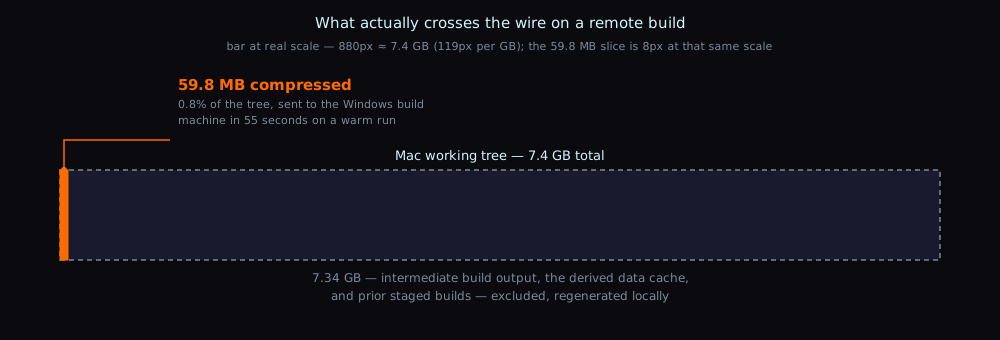
The Windows-side package script is the same logic as the local one, ported: append the EOS credentials to the engine config for the duration of the cook, run the engine’s own cook-and-stage automation, restore the config file afterward regardless of outcome. A packaged build can’t take the -ini: command-line overrides the editor uses for credentials, so this in-place, restore-after edit is the packaging-time equivalent.
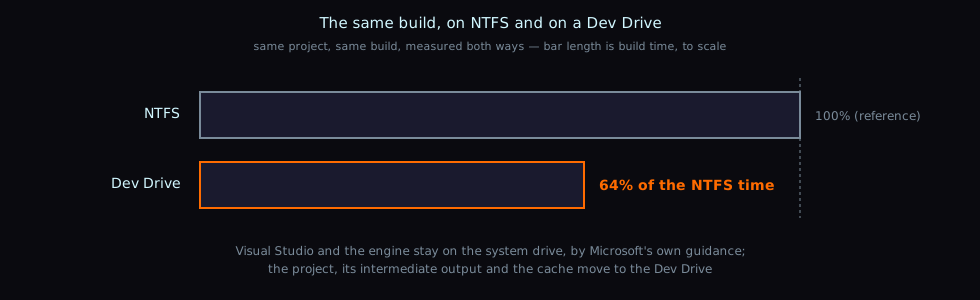
The build machine itself needed a Dev Drive — a ReFS volume with Defender’s synchronous scanning deferred — to get Unreal’s small-file churn through its intermediate build output and derived data cache off NTFS: the same build, measured both ways, took 64% as long on the Dev Drive as it did on NTFS. Visual Studio and the engine stay on the system drive by Microsoft’s own guidance; the project, its intermediate output and the cache live on the Dev Drive.
The Dev Drive is also where SSH access has to land once the key is in the administrators’ authorized-keys file rather than the signed-in user’s own — Windows’ shipped SSH config redirects members of the administrators group there, silently ignoring a key placed anywhere else.
The failures the editor hides
A few faults specifically don’t show up until something runs outside the editor, which is why all of the above earns its keep instead of stopping at Play-in-Editor:
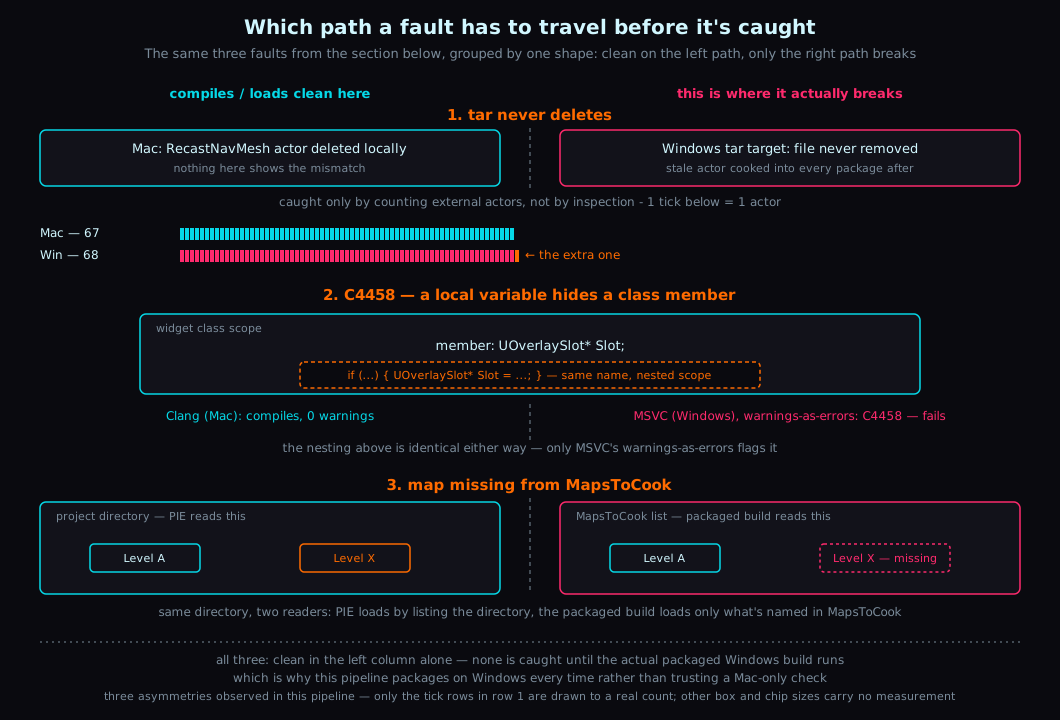
A map absent from MapsToCook is not staged, and PIE loads it from the project directory regardless of what the cook config says. The editor and the packaged build read the level from two different places, so this class of fault is invisible until someone actually runs the packaged executable.
tar never deletes. The remote build wipes the payload directories on the Windows machine before every send specifically because of this — without that, a file removed locally keeps living on the build machine and keeps being cooked into every package after it. That happened for real: an empty RecastNavMesh — the navigation data actor generated for a level’s pathfinding — deleted locally stayed behind on the Windows build machine and was cooked into every Windows package that followed, so an AI agent couldn’t path-find on Windows while the identical project worked fine locally. It read as a platform difference. It was a sync problem, and it was found by counting files — 67 external actors for the level on one machine against 68 on the other.
A clean Mac build says nothing about Windows for warnings-as-errors. C4458 — a local variable that hides a class member, here an if-scoped UOverlaySlot* named the same as a slot UWidget itself already declares — is an error under MSVC’s warnings-as-errors setting and compiles without complaint under Clang. Nothing about a green build on macOS predicts it.
Driving the game itself
Every fault in the section above was caught by something other than a person watching the game run — a file count, a compiler flag, a missing entry in a config list. None of that touches the one class of bug this project actually has a scar from: the multiplayer flow itself, the piece that used to mean two people at two keyboards, walking to a cube.
-ExecCmds runs console commands at startup, which sounds like enough to drive a whole host-and-join flow until the commands actually run: all at once, with no way for one to wait on another. My first attempt chained a login command straight into a lobby-creation command on the same -ExecCmds line, and it failed exactly the way you’d predict once I thought about the ordering: the lobby-creation command ran before sign-in had reported anything back, and it errored against an identity that didn’t exist yet.
The fix was to write commands that defer internally rather than composing several fire-and-forget ones. eos.Host signs in and only creates the lobby once sign-in reports success — a bool flag set going in, consumed by the login callback:
void ULobbySubsystem::HostAfterLogin()
{
    bCreateLobbyOnLogin = true;

    if (bLoggedIn)
    {
        bCreateLobbyOnLogin = false;
        CreateLobby();
        return;
    }

    Login();
}
eos.PressButton does the same shape of thing on the other end of the flow — it presses the map’s button immediately if hosting has already started, or sets a flag consumed the moment it does:
void ULobbySubsystem::PressButtonWhenHosting()
{
    if (bInLobby)
    {
        PressButtonNow();
        return;
    }

    bPressButtonOnHosting = true;
}
Both commands are registered by the game module rather than as static FAutoConsoleCommand objects — a static one is destroyed during __cxa_finalize, after the console manager has already gone, and crashes the editor on exit every single time. With both in place, a full host flow is one line at launch:
YourGame.app/Contents/MacOS/YourGame -ExecCmds="eos.Host,eos.PressButton"That’s the change that mattered. A transition only reachable by walking to a cube and pressing a key is a transition nobody re-tests by choice, and twice already, in different shapes, a bug that only that walkthrough could catch had gone unnoticed for a while — not because the transition itself was hard to get right, but because verifying it by hand was tedious enough that it kept not happening, and what exactly had last been checked never survived anywhere but memory. Two people at two keyboards is no longer what it takes to know whether that transition still works.
Things still bugging me
The [CoreRedirects] fix in the first section has a cost that shows up the more times this project line gets continued rather than started fresh, because the class path baked into content is /Script/<module name>.<class name> and the module name currently carries the iteration’s own number. Each continuation means redoing that redirect work again, and by the end of the most recent one it was still an open question, recorded as carried-over rather than acted on: whether the real fix is to stop the module name from changing between iterations at all, so nothing downstream ever needs remapping again. Nobody has tried it — newproject.sh assumes the module name matches the project name, and whether a .uproject whose name and module name disagree causes any trouble is untested.
The Windows build machine currently runs the full Visual Studio Community install Epic ships, including two IDE-only components a headless machine never touches. Whether a Build Tools–only install would suffice is untested — the full list is just the safe default until something smaller is shown to work.
Driving the flow still ends in a human reading a log file. -ExecCmds gets the flow running without hands on a keyboard, but nothing yet parses the output and turns it into a pass or fail; “did it work” is still answered by eyeballing flow.log.
That gap isn’t unique to this flow. A later fault on this same project turned out to need a person watching the screen for a reason no script could substitute for — the harness that eventually caught it kept a human reading the result on purpose, for the same reason flow.log still does here.
Wrap-up
None of these pieces were built together — each one showed up because the previous way of doing that particular step had already wasted an evening. The pattern only became visible afterward: every one of them is the same move, taking a step that used to need a human in the loop and making it something a script can do unattended. The next candidate for the same treatment is the log-reading gap above — once a script can say pass or fail on its own, the last human-shaped step in this pipeline goes away too.