The evenings I carve out for game dev usually go to Unity. For two weeks across late April and early May, they all went to Godot instead.
I gave myself a constraint: build everything in Godot 4.6 with C#, one repo, no falling back to Unity when something got awkward. The repo is public.
https://github.com/tang3cko/Sandbox_003
This post is the after-action. What got built, what Godot was actually fast at, what it cost me, and how the experiments ended up shaping the Unity work I came back to.
What I was trying to find out
I wasn’t shopping for a new engine. I like Unity. The Reactive SO library I’ve been building lives there, the InputSystem package, the Asset Store dependencies — none of that was going anywhere.
What I wanted to know was narrower: how fast can Godot prototype a single gimmick? Unity’s “open a new scene, drop in a few packages, write the bridge code” cycle was eating hours of my evenings before I’d tested whatever idea I’d actually opened the editor for. A 30-line idea was costing me a full session. I had a suspicion Godot’s scene tree and Resource model would shorten that loop, and I wanted to measure it instead of guess.
The pace
Eight numbered subprojects landed in fifteen days, from 01_godot_basics on April 20th to 08_voxel_terrain_godot on May 4th. Each one is a separate project.godot in the same repo, with its own README. The commit log is short and obvious:
| Date | Project | Gimmick under test |
|---|---|---|
| 04-21 | 02_td_in_godot | Tower defense — Signal + Resource architecture with a pure-function calculator |
| 04-21 | 03_action_in_godot | Arena survival — physics, navigation, animation, audio, particles |
| 04-22 | 03_action_in_godot | Animation systems for player and enemy (AnimationTree state machines) |
| 04-22 | 03_action_in_godot | VFX pipeline + projectile refactor |
| 04-25 | 04_shaders_in_godot | Swarm Survivor — GDShader, MultiMesh, screen-space compositor effects |
| 04-27 | 05_multiplayer_godot | Multiplayer Swarm Survivor over ENet |
| 04-27 | 06_escape_room_godot | First-person interaction pipeline |
| 04-29 | 05_multiplayer_godot | Multiplayer restructure — calculator pattern + network snapshots |
| 05-03 | 07_persistence_in_godot | Save and settings persistence (atomic temp+rename, CRC32, backups) |
| 05-04 | 08_voxel_terrain_godot | Destructible voxel terrain with a Marching Cubes mesher |
I’m including the table because the pace was the point. The two action-game commits on the same day weren’t planned — I finished the basic Tower Defense in an evening and had appetite left, so the action prototype went in the same night.
Where Godot earned the time back
A few patterns kept repeating across those projects, and they all came down to “I didn’t have to make a decision.”
The scene tree plus node-as-script means one gimmick can be one node and one script. I’m not stopping to ask where a thing should live, because the node it’s attached to already answers that. When I wanted to test whether MultiMesh-rendered enemies could carry per-instance shader data through INSTANCE_CUSTOM, I wrote one SwarmRenderer script attached to one MultiMeshInstance3D and that was the entire test surface.
_Process and _PhysicsProcess being separate methods on the same node removes a class of question I keep having to ask in Unity (“which Update should this go in?”). The answer is the method name. Small thing per use, but it adds up across fifteen prototypes.
Built-in 2D animation, particles, and shaders mean no choosing packages. URP vs HDRP vs Built-in, Shuriken vs VFX Graph, the input package situation — none of that came up. I’m not claiming Godot’s pipelines are better. “No choice” is just faster than “good choice” when you’re sketching.
The thing that surprised me most was C# hot-reload. I’d assumed it would be GDScript-only. It isn’t. Godot’s .NET workflow recompiles and hot-reloads C# changes inside the running editor, and for shader-adjacent scripts that’s the difference between iteration and re-launch.
Where Godot cost me time
The asset import story for anything beyond primitives is rough. The action prototype gets away with capsule meshes generated in code precisely because authoring an FBX-heavy project in Godot would have eaten more time than I’d budgeted for the gimmick. Unity’s asset pipeline is the thing I missed most.
Test-driven C# was workable but more friction than Unity’s Edit Mode. The Tests/ subprojects in 02, 03, 04, 06, 07 and 08 run as plain dotnet test against pure-function calculators I deliberately kept Godot-free. That worked because the Humble Object discipline was already in my head from the Unity side. If I were learning Godot fresh I’d have ended up coupling logic to nodes and lost the testability.
I also missed the Reactive SO ecosystem itself. The Godot side has a port I copied into addons/ReactiveSO/, and the core works — Resource + Signal maps onto ScriptableObject + Event channel almost one-to-one. The Variable inspector tooling I’ve built on the Unity side wasn’t there, though, and I noticed every time I wanted to debug a value at runtime.
The persistence detour was the loudest lesson
I’d originally pencilled in 07_persistence_in_godot as “encrypted save and version migration.” A couple of evenings into reading around what other indie devs talk about doing, I talked myself out of the encryption part before I wrote any of it.
I poked around at what shipped indies I happen to play seem to do — Balatro, Animal Well, UFO 50, Pacific Drive, Brotato, Halls of Torment. As far as I can tell from the outside, save editors circulate freely for most of them and the games seem fine. The key always ships inside the binary anyway, so for a hobby project encryption felt like theatre to me. What I kept seeing in write-ups and post-mortems instead was the same handful of pieces: an integrity check (CRC32 or xxHash), atomic write, multi-generation backup, and fail-soft on corruption. That’s what I aimed 07 at.
So the project ended up being a handful of pure-C# pieces — SaveSerializer, Crc32, SaveDataMigrator, SettingsData — plus a thin Godot IO shell on top. The atomic write had its own surprise. OS.SetUseFileAccessSaveAndSwap doesn’t exist in scripting, the C++ set_backup_save helper is unbound and off by default, and Godot issue #98360 documents file corruption under power loss on multiple platforms. From reading that thread my takeaway was that manual temp-then-rename in user code was the path I’d be happiest with, so I wrote one. Backups rotate after the new file is durably on disk, not before, so a crash at any step still leaves a valid generation behind.
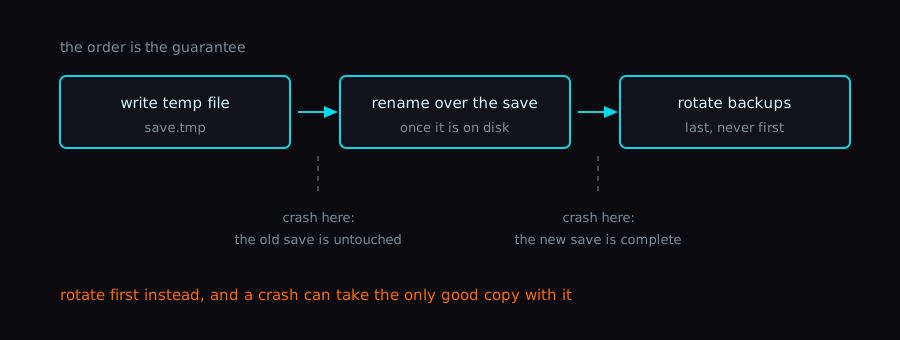
The gimmick I came for was “try FileAccess.” What I left with was a persistence sketch I felt good enough about to port back to Unity for my own projects.
Voxel terrain was the one I almost skipped
08_voxel_terrain_godot started as a blocky face-culling mesher and then escalated. The Marching Cubes implementation transcribes the lookup tables verbatim from dwilliamson’s public gist, and the winding-order question consumed an entire evening. Godot treats CW as front-facing, the MC tables produce CCW from the solid side, and the wrong choice leaves you with an invisible terrain you can still collide with. The fix is to reorder each triangle from (a, b, c) to (a, c, b) on the way out of the mesher; obvious in retrospect, not obvious at the time.
Both meshers live in Scripts/Core/ behind a strategy interface, because the blocky version is genuinely useful for a different aesthetic. The Marching Cubes path uses a Donkey Kong Bananza-style “positive-inside” density field where density > 0 is solid and density < 0 is air. That inverts the textbook SDF sign, but it makes the boolean ops read naturally in code — dig = min(old, -brush), place = max(old, brush).
The reason I bring this up: I would not have built this in Unity on a weekend. Setting up the equivalent — render pipeline choices, a mesh-rebuild pump that doesn’t fight the Job System — would have been its own project. In Godot it was a sprint.
How the experiments fed back
The whole point of the sandbox was to inform the Unity work, not replace it. Each project I came back to had something to absorb.
The interaction pipeline from the escape room (IInteractable / IInteractor, composable InteractionValidator resources, hold-to-interact with progress, runtime input-glyph resolution) translated almost cleanly into the pickup and equipment side of the Unity action prototype I picked back up afterwards. The validator-array pattern in particular dropped straight in.
The multiplayer restructure on day 10 was the bigger lesson. Splitting the network layer into a pure-function calculator that takes a snapshot and returns a new snapshot, with the Godot side acting as the IO shell, was the pattern I’d been groping for on the Unity multiplayer side. Server-authoritative migration there got noticeably less painful once the calculator/shell split was locked in.
The MultiMesh and screen-effects experiments in 04 are now my reference for checking URP feature parity on the Unity side. Whether I keep URP or not is still open, but the questions are sharper.
The persistence work in 07 should port to Unity without much fuss. The pure-C# pieces have no Godot dependency, and the temp-then-rename bit is OS-level, not engine-level.
If I’d tried to poke at any three of those inside Unity on my evenings, I’d probably still be on prototype two.
When the sprint was worth it for me
I’m being careful with this section because game dev is a hobby for me around a day job, not a thing I do for anyone else. What follows is the rule of thumb I ended up using on my own evenings, not advice for anyone else’s setup.
The sprint was worth it when the gimmick was the entire question, and not the asset pipeline or the input system or the tooling around it. Godot’s “scene tree + node script” loop was fast enough to absorb the context switch. The bar in my evenings was something like “would Unity otherwise eat three hours setting up the scene before I touched the actual idea”. When three competing approaches were on the table for one problem, the sketchpad cost me half a day each instead of a full day, which paid off across the set.
The sprint wasn’t worth it when the gimmick depended on something Unity-only — DOTS, NGO, a specific Shader Graph feature, a package I’d already integrated against. The port back was real work, and switching contexts for something that wouldn’t survive the trip was just tax on my evening.
Wrap-up
What this sprint produced is a folder of small projects I can grep through next time I’m stuck. That’s what I wanted it to be. The prototypes turning out small enough to finish in one sitting was the part I didn’t bank on.
Back to Unity for a while now.