A previous prototype of mine had a voxel digger that mostly worked. You could swing a virtual shovel at the terrain and a sphere would carve out where you hit. The carving never closed up cleanly, though. At certain dig angles you could see straight through the world. I let that ship as-is at the time and moved on.
When I started the next project, voxel terrain was again the core mechanic. I copied over only the bits I needed (the density field, the Marching Cubes mesher, the SDF brush) and decided to rewrite the broken part properly before piling anything else on top.
This post is about what was actually wrong, what I replaced it with, and the small editor window that made the rewrite tractable.
The symptom
The world is a 3D scalar field where positive values are solid earth and negative values are air, with the surface lying on the zero-isosurface. A dig event subtracts a sphere from the field:
// SdfEdits.cs (excerpt)
float brush = radius - dist;            // positive inside the sphere
float old = field.Get(x, y, z);
float updated = shouldSubtract
    ? Math.Min(old, -brush)              // SDF subtraction
    : Math.Max(old, brush);
After every edit, dirty chunks rebuild their mesh by running Marching Cubes over the density samples. When the carved sphere happened to sit on integer voxel coordinates, the result looked fine. When the dig height was off-grid (the common case, because the player aims at hit-point coordinates) the rebuilt mesh sometimes had visible triangles missing, with the camera looking right through into the hollow.
The shape of the holes was the giveaway. They always appeared at cells where the eight corners formed an ambiguous Marching Cubes case: two diagonally-opposite solid corners on a face, with the other two empty. Different valid surfaces pass through that configuration. The algorithm has to pick one, and the original implementation was picking the wrong one for the neighbour cell.
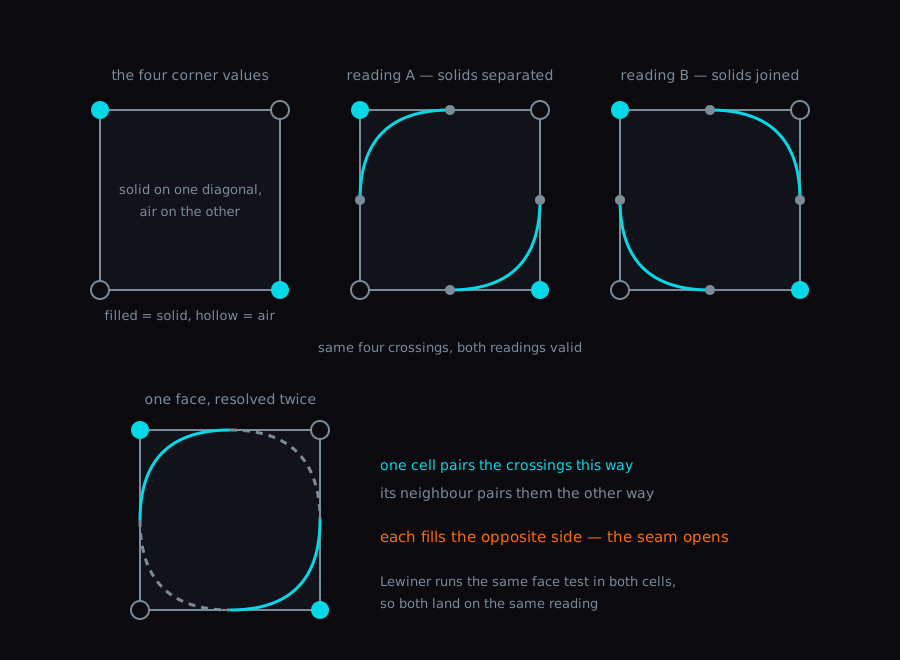
Both readings cross the same four edge points, so neither is wrong on its own. The damage happens when the two cells sharing that face don’t make the same choice.
Why the textbook Marching Cubes table breaks here
The version I had ported was the classic Paul Bourke / Lorensen & Cline table: 256 case indices keyed by the eight-bit inside/outside pattern of the corners, each mapped to a fixed triangle list. One lookup, very compact, and it has a known correctness flaw at the face and interior ambiguities (cases 3, 6, 7, 10, 12, 13 in the canonical numbering). When two neighbouring cells resolve the same shared face inconsistently, you get a crack.
For a static heightmap-like world it rarely matters. For a player carving spheres at runtime, the ambiguous configurations land under the cursor constantly, because the brush boundary is a sphere with a smooth SDF and every off-grid carve produces these saddle-shaped corner patterns at the rim.
My read was that I needed a different table. Tweaking the existing one felt like it would just shuffle which cases broke.
Switching to Lewiner
I replaced the lookup with the table from Lewiner et al., specifically the LUTs distributed with scikit-image (BSD-3, regenerated from their _marching_cubes_lewiner_luts.py). The Lewiner formulation splits the 256 cases into 15 equivalence classes, each with one or more sub-configurations, and uses runtime tests on the corner densities to pick the topology-correct tiling.
The mesher driver loop in MarchingCubesMesher.Build looks like this in outline:
var descriptor = GetCaseDescriptor(caseIndex);
sbyte[] tiling = ResolveTiling(descriptor.caseClass, descriptor.config, cornerValues);
ResolveTiling is the switch over the 15 classes. The easy classes return their tiling directly. The ambiguous ones run a face test or an interior test:
case 3:
    return TestFace(GetValue(MarchingCubesTablesLewiner.Test3, config, ...), cornerValues)
        ? GetRow(MarchingCubesTablesLewiner.Tiling3_2, config, ...)
        : GetRow(MarchingCubesTablesLewiner.Tiling3_1, config, ...);
case 4:
    return TestInterior(caseClass, config, 0, ..., cornerValues)
        ? GetRow(MarchingCubesTablesLewiner.Tiling4_1, config, ...)
        : GetRow(MarchingCubesTablesLewiner.Tiling4_2, config, ...);
TestFace checks the sign of the bilinear interpolant on a shared face, which tells you which way the surface should bend through the saddle. Because both neighbouring cells run the same test on the same shared corner values, they agree on which configuration to use, and the seam closes.
There were a couple of details I had to be careful with.
The Lewiner tiling emits triangles CCW as seen from the air side of the surface. The right-hand cross product of those edges points into the solid, which is opposite to the outward normal Unity wants for front-face culling. The mesher swaps the second and third indices when adding each triangle so the visible orientation comes out right:
// Lewiner tables emit CCW from the air side, whose RH cross
// points into the solid — the opposite of OutwardNormal.
// Swap to keep face normal aligned with the outward normal
// and Unity's CW = front-face culling.
mesh.AddTriangle(vertex0, vertex2, vertex1);
Some sub-configurations in classes 6, 7, 10, 12, 13 need an extra center vertex inside the cube to fan triangles from. The mesher detects this by scanning the tiling for a sentinel edge index and computes one center position per cube when needed, rather than always.
After the swap, the carved cavities close. Dig at any height, any angle, and there’s no more daylight where there shouldn’t be.
Making the dig feel less mushy
Around the same time I was reworking the algorithm, I also rewrote how the dig got triggered. The original code had DiggingTool directly calling into the world, which coupled input timing to mesh rebuild timing. The feel was sluggish. There was a perceptible lag between clicking and the surface giving way.
The rewrite splits the path into two event-channel hops.
DiggingTool raycasts from the camera, and when the cooldown is ready it raises onDigPerformed with a DigRequest(brushCenter, radius). VoxelWorld listens for that, runs the SDF subtraction, rebuilds the dirty chunks, and then raises a second event, onDigCarved, with a DigCarved payload carrying the brush center, radius, and a HasChanged flag:
private void HandleDigPerformed(DigRequest request)
{
    if (receiveThrottle != null && !receiveThrottle.IsReady) return;

    bool hasDug = DigSphereCommand(request.BrushCenter, request.Radius);
    onDigCarved?.RaiseEvent(new DigCarved(request.BrushCenter, request.Radius, hasDug));
    receiveThrottle?.ArmAfterDig(minDigInterval, hasDug);
}
Anything that wants to react to a successful carve subscribes to that second event. A loot dropper, an audio router, future systems I haven’t written yet — none of them have to know about VoxelWorld, only about the event channel asset. FixedProbabilityDigCarvedDropper.HandleDigCarved spawns a placeholder lantern at the brush center with a fixed probability. DigCarvedAudioRouter.HandleDigCarved raises an audio play request, throttled so the rapid-fire dig interval doesn’t buzz.
The event pattern uses the same Reactive SO library I’ve been building for my own game work, which keeps the wiring consistent with the rest of the project:
https://github.com/tang3cko/ReactiveSO-docs
The responsiveness gain came entirely from removing the synchronous chain between input and effect; the algorithm work itself didn’t make the click feel any faster. The dig request returns immediately and everything downstream is fired-and-forget.
The editor window that made the fix tractable
The reason I could iterate on the mesher at all was a small editor window I built first. Debugging topology bugs by running play mode, swinging the camera, and clicking on terrain was wearing me down. I wanted to be able to paint into the density field directly while watching the mesh update.
VoxelEditorWindow is a SceneView.duringSceneGui subscriber that hijacks left-click+drag inside the scene view while the window is open. The active tool is a spherical SDF brush with optional value-noise jitter on the rim, so painted cavities come out naturally rough rather than as perfect spheres. That’s handy for the “buried street” aesthetic the next project is going for, and irrelevant to the topology test but pleasant to look at while testing.
// VoxelBrush.cs — the rim jitter
float jitter = (ValueNoise3D(nx, ny, nz, noiseSeed) * 2f - 1f) * noiseStrength;
float brush = (radius + jitter) - dist;
A few things about the window mattered for the algorithm work specifically.
Strokes are wrapped in Undo.IncrementCurrentGroup and Undo.SetCurrentGroupName("Voxel Stroke") with a RegisterCompleteObjectUndo on the world data asset. Real-time undo means I could paint a stroke, see a hole, press Ctrl+Z, tweak the mesher, and repaint exactly the same stroke to verify the fix.
VoxelChunk flags both its visual mesh and its collision mesh with HideFlags.DontSave:
visualMesh = new Mesh { name = $"{name}_VoxelMesh", indexFormat = IndexFormat.UInt32 };
// Chunk meshes are derived runtime artifacts; keep them out of scene serialization.
visualMesh.hideFlags = HideFlags.DontSave;
Without that flag, every iteration was polluting the scene file with a fresh mesh asset. With it, the scene diff stays clean and only the actual authoring data (the quantised density buffer) gets serialised.
[ExecuteAlways] on VoxelChunk runs the same Awake path in the editor as in play mode, so the mesh shows up in the scene view without entering play mode. The mesher I’m debugging in the scene view is the same mesher that runs at runtime; there’s no edit-mode shadow path to keep in sync.
None of these are clever, individually. Put together, the iteration loop on the algorithm fix came out at around two seconds: paint a stroke, look at the result, edit the mesher, watch the domain reload, paint again.
Wrap-up
The thing I want to remember from this is the order: rebuild the editor experience first, then fix the algorithm. I spent maybe a day on the editor window and the chunk-side HideFlags plus [ExecuteAlways] plumbing before touching the mesher. That day paid for itself within an hour of starting the actual fix, because every hypothesis about which case was failing could be tested in seconds instead of minutes.
For this project, I’m done with the textbook MC table. Lewiner is more code, but the code is one switch statement of finite size, and on my carve patterns it didn’t show the holes the old table did.
https://en.wikipedia.org/wiki/Marching_cubes
References
- Lorensen, W. & Cline, H. (1987). “Marching Cubes: A High Resolution 3D Surface Construction Algorithm.”
- Lewiner, T., Lopes, H., Vieira, A. & Tavares, G. (2003). “Efficient implementation of Marching Cubes’ cases with topological guarantees.”
- scikit-image Marching Cubes (Lewiner) LUTs source (BSD-3)
- Paul Bourke — Polygonising a scalar field
- Unity — HideFlags.DontSave
- Unity — ExecuteAlways