This article was originally written for Unity Advent Calendar 2025 Series 2, Day 18.
I’m tang3cko, a game development beginner who started Unity seriously in my 30s. Alongside my own game development, I’ve been building a ScriptableObject-based library. At one point I really wanted a way to automatically sync ScriptableObject-managed variables (let’s call them VariableSO) to shaders, so I’ll walk through how I implemented it.
Here’s a demo video of the feature in action:
Background
Writing bridge code every time I want to pass runtime values to a shader has always felt tedious. It’s only a few lines each time, but as a game grows those lines get scattered across the codebase and become hard to manage.
I work on non-Unity projects too where this kind of CPU↔GPU plumbing comes up often, and I sometimes find myself envying macOS’s Unified Memory.
The Conventional Approach
When you want to reference gameplay state from a compute shader or custom shader, you usually end up writing something like this:
public class PlayerEffectController : MonoBehaviour
{
    [SerializeField] private ComputeShader computeShader;
    [SerializeField] private Material effectMaterial;
    [SerializeField] private Player player;

    void Update()
    {
        // Manually sync every frame
        Shader.SetGlobalVector("_PlayerPosition", player.transform.position);
        Shader.SetGlobalFloat("_PlayerHealth", player.health);
    }
}
It works, but a few things bother me:
- Effects and game logic become tightly coupled
- Sync code gets scattered across the project
- When multiple shaders need the same value, you still have to write sync code somewhere
Especially as the project grows, you start asking yourself: “where am I syncing this value again?”
What I Wanted
Ideally, I wanted VariableSO to look like this:
FloatVariableSO (PlayerHealth)
├── Value: 75.0
└── ☑ GPU Sync Enabled
    └── GPU Property Name: _PlayerHealth
Tick a checkbox in the Inspector, and the value is automatically pushed to the shader. The shader side just reads, without knowing anything about the source.
// Doesn't know where it came from — just reads it
float playerHealth = _PlayerHealth;
Defining things as shader globals does have its downsides, but for this use case I decided it was fine.
Implementing It
The Basic Mechanism
The implementation still uses Shader.SetGlobalXXX() under the hood — same as the bridge-code approach. The difference is that the call happens automatically whenever the VariableSO’s value changes, so you don’t need to write a bridge for each one.
public abstract class VariableSO<T> : VariableSO
{
    [Header("GPU Sync")]
    [SerializeField] private bool gpuSyncEnabled;
    [SerializeField] private string gpuPropertyName;

    public T Value
    {
        get => value;
        set
        {
            if (!EqualityComparer<T>.Default.Equals(this.value, value))
            {
                this.value = value;
                RaiseValueChangedEvent(value);

                if (gpuSyncEnabled && Application.isPlaying)
                    SyncValueToGPU();
            }
        }
    }

    // Implemented per-type in derived classes
    public abstract void SyncValueToGPU();

    private void OnEnable()
    {
        // Initial sync when Play Mode starts
        if (gpuSyncEnabled && Application.isPlaying)
            SyncValueToGPU();
    }

#if UNITY_EDITOR
    private void OnValidate()
    {
        // For Editor preview
        if (gpuSyncEnabled && !string.IsNullOrEmpty(gpuPropertyName))
            SyncValueToGPU();
    }
#endif
}
Per-Type Implementations
Each type calls a different shader method, so derived classes override SyncValueToGPU():
public class FloatVariableSO : VariableSO<float>
{
    public override void SyncValueToGPU()
    {
        Shader.SetGlobalFloat(GPUPropertyName, Value);
    }
}

public class Vector3VariableSO : VariableSO<Vector3>
{
    public override void SyncValueToGPU()
    {
        Shader.SetGlobalVector(GPUPropertyName, new Vector4(Value.x, Value.y, Value.z, 0f));
    }
}

public class ColorVariableSO : VariableSO<Color>
{
    public override void SyncValueToGPU()
    {
        Shader.SetGlobalColor(GPUPropertyName, Value);
    }
}
Supported Types
Supporting every type is impractical, so for this implementation I limited support to the following:
| Variable Type | Shader Method | HLSL Type |
|---|---|---|
| FloatVariableSO | SetGlobalFloat | float |
| IntVariableSO | SetGlobalInt | int |
| Vector2VariableSO | SetGlobalVector | float4 (xy used) |
| Vector3VariableSO | SetGlobalVector | float4 (xyz used) |
| ColorVariableSO | SetGlobalColor | float4 |
| BoolVariableSO | SetGlobalInt | int (0/1) |
Why aren’t String / Long / Double supported? Because they “can’t be used on the GPU, or it doesn’t make sense to”:
| Type | Reason |
|---|---|
| String | Shaders don’t support strings |
| Long | Shader integers are typically 32-bit |
| Double | Shader floats are 32-bit (a few GPUs support 64-bit, but it’s not common) |
Demo
To verify the feature, I built a demo with 10,000 particles (“motes” — specks of light) drifting around the player.
Setup
The demo is intentionally inefficient — it uses two kinds of particles to verify that both shaders and Shuriken can reference the same variables:
- Mote (specks of light)
- Compute Shader + Fragment Shader + DrawMeshInstancedIndirect
- Spring-damper physics simulation
- Glow effect when the player gets close
- Ripple
- Shuriken ParticleSystem + custom shader
- Ring-shaped effect appearing at the player’s feet
Both share _RippleColor via GPU Sync. Change the color in the UI and Mote and Ripple update simultaneously — and the other parameters can be changed dynamically too.
The VariableSOs in Use
Here are the variables and where each one is referenced:
| Variable | Type | Referenced By |
|---|---|---|
_PlayerPosition | Vector3VariableSO | Mote (Compute/Fragment) |
_RippleColor | ColorVariableSO | Mote (Fragment), Ripple (Shuriken) |
_MoteCount | IntVariableSO | Mote (Compute) |
_CullDistance | FloatVariableSO | Mote (Compute) |
_RepulsionRadius, _SpringStiffness, _Damping, etc. | FloatVariableSO | Mote (Compute) |
Architecture
When you change a parameter from the UI, the new value automatically reaches the shader through the VariableSO. You don’t write any bridge code — the bridge lives inside the Variable itself — so it’s straightforward to share the same variable with a shader.
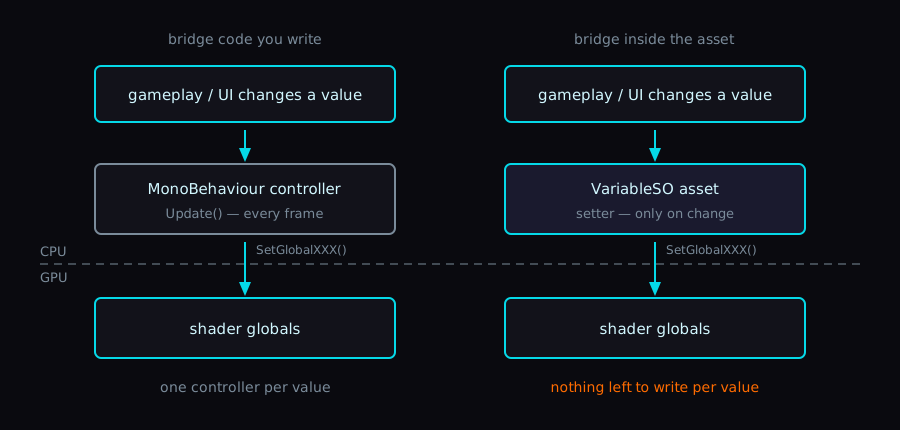
The call that crosses the boundary is the same one in both columns. What changes is who owns it.
Shader-Side Code
In the compute shader, you just declare the global properties:
// Global properties: automatically synced via VariableSO's GPU Sync feature
float4 _PlayerPosition;     // Vector3VariableSO
float _CullDistance;        // FloatVariableSO
float _RepulsionRadius;     // FloatVariableSO
float _SpringStiffness;     // FloatVariableSO
int _MoteCount;             // IntVariableSO

[numthreads(128, 1, 1)]
void UpdateMotes(uint3 id : SV_DispatchThreadID)
{
    // Use _PlayerPosition to compute the repulsion force
    float3 toMote = motes[id.x].position - _PlayerPosition.xyz;
    float distToPlayer = length(toMote);

    if (distToPlayer < _RepulsionRadius)
    {
        // Repulsion handling...
    }
}
The custom shader for the Shuriken Ripple works the same way:
// Global property: auto-synced from a ColorVariableSO
float4 _RippleColor;

float4 frag(Varyings input) : SV_Target
{
    // Ring shape calculation...

    // Color sourced via GPU Sync
    float3 color = _RippleColor.rgb * _Intensity;
    return float4(color, alpha);
}
On the C# side you just reference the VariableSO via SerializeField — no sync code required:
[Header("VariableSO - Simulation Parameters")]
[SerializeField] private IntVariableSO moteCountVariable;
[SerializeField] private FloatVariableSO cullDistanceVariable;
[SerializeField] private FloatVariableSO repulsionRadiusVariable;
// ...

// DispatchCompute() has no sync code.
// The VariableSO calls Shader.SetGlobalXXX() on its own.
On Performance
Shader.SetGlobalXXX() is lightweight, so calling it every frame is fine. In practice the call rate is even lower because the sync only fires when the value actually changes.
Use Cases
Some situations where this fits well:
Player-position-driven effects
Vector3VariableSO (PlayerPosition)
├── ☑ GPU Sync Enabled
└── GPU Property Name: _PlayerPos

Shader: particles swirl around _PlayerPos
Visualizing an area-of-effect attack
Vector3VariableSO (AoECenter)  → _AoECenter
FloatVariableSO (AoERadius)    → _AoERadius

Shader: tint everything within _AoERadius of _AoECenter red
Time-based effects
FloatVariableSO (DangerLevel)  → _DangerLevel

Shader: redden the screen based on _DangerLevel
Wrap-up
Automatic ScriptableObject-to-shader sync turned out to be easier to implement than I expected.
This feature is planned for inclusion in v2.0.0 of Reactive SO (formerly Event Channels), the package I’m working on. It’s published on the Asset Store, so take a look if you’re curious.
Unity Asset StoreReactive SO | Game ToolkitsScriptableObject-based reactive architecture for Unity. Variables, Event Channels, Runtime Sets, GPU Sync, Reactive Entity Sets, and dedicated debugging windows.Carving out time alongside the day job isn’t easy, but I’ll keep at it next year.