This article introduces Reactive SO — a ScriptableObject-based reactive architecture for Unity.
Unity Asset StoreReactive SO | Game ToolkitsScriptableObject-based reactive architecture for Unity. Variables, Event Channels, Runtime Sets, GPU Sync, Reactive Entity Sets, and dedicated debugging windows.If you’ve worked on a Unity project of any significant size, you’ve probably experienced the pain of tightly coupled code. Player scripts that reference UI directly. Managers that know about everything. I ran into this early in my Unity journey, and testing becomes a nightmare when changing one thing breaks three others.
Reactive SO is my attempt to address this problem.
A Note on DOTS First
If you’re starting a new project and performance is critical, Unity DOTS might be worth considering first.
Reactive SO is for developers who want decoupling without leaving the GameObject workflow. It’s not trying to compete with DOTS on performance — DOTS will win that battle for large-scale entity processing.
Where Reactive SO fits:
- Projects where you want decoupling without learning ECS
- UI state, game events, configuration data
- Cases where change frequency is low (Reactive pattern shines here)
If you’re building something with thousands of entities updating every frame, DOTS might be the better choice. Reactive SO seems to work well for everything else.
The Problem I Noticed Early On
Here’s code that probably looks familiar:
public class Player : MonoBehaviour
{
    public HealthBar healthBar;      // Direct UI reference
    public GameManager gameManager;  // Manager reference
    public AudioManager audioManager; // Audio reference

    public void TakeDamage(int amount)
    {
        health -= amount;
        healthBar.UpdateDisplay(health);  // Directly notify UI
        audioManager.PlaySound("hit");    // Directly notify audio
        if (health <= 0)
            gameManager.OnPlayerDeath();  // Directly notify game state
    }
}
This works. But I noticed some issues:
- Testing was painful — I needed all those references just to test damage logic
- Changes cascaded — Rename a method in HealthBar? Update every caller
- Scene boundaries — What if the UI is in a different scene?
- Reusability — This Player class only worked with these specific managers
A Different Approach
With Reactive SO, the same logic becomes:
public class Player : MonoBehaviour
{
    [SerializeField] private IntVariableSO health;
    [SerializeField] private VoidEventChannelSO onPlayerDeath;

    public void TakeDamage(int amount)
    {
        health.Value -= amount;  // Observers notified automatically
        if (health.Value <= 0)
            onPlayerDeath.RaiseEvent();  // Event broadcast
    }
}
flowchart LR
subgraph Assets["ScriptableObject Assets"]
Health[("Health<br>(IntVariableSO)")]
Death[("OnPlayerDeath<br>(VoidEventChannelSO)")]
end
subgraph Scene["Scene Objects"]
Player[Player]
UI[HealthBar UI]
Audio[AudioManager]
GM[GameManager]
end
Player -->|writes| Health
Player -->|raises| Death
UI -->|observes| Health
Audio -->|subscribes| Death
GM -->|subscribes| Death
The Player doesn’t know who’s listening. The UI doesn’t know who’s writing. They communicate through ScriptableObject assets that exist independently of any scene.
Origins — Ryan Hipple and Unite Austin 2017
Reactive SO didn’t emerge from nothing. It stands on the shoulders of a talk that shaped how I think about Unity architecture.
In 2017, Ryan Hipple from Schell Games presented “Game Architecture with Scriptable Objects” at Unite Austin. His core insight was simple but powerful:
ScriptableObjects aren’t just data containers — they can be the foundation of your architecture.
He introduced three patterns:
| Pattern | Purpose |
|---|---|
| Variables | Shared state as assets (FloatVariable, IntVariable) |
| Events | Decoupled communication through GameEvent assets |
| Runtime Sets | Track objects without singletons |
This talk became one of the most-watched Unite sessions ever. It spawned frameworks, influenced countless projects, and established “ScriptableObject Architecture” as a recognized approach.
Standing on Shoulders — Unity Atoms and Others
Ryan Hipple’s talk inspired several implementations.
Unity Atoms
The most comprehensive implementation of Hipple’s patterns:
- Full Variables, Events, Runtime Sets support
- Instancer system for per-instance state
- Rich editor tooling
When I started learning Unity, I looked into Unity Atoms as a potential architecture solution.
But I found that development had seemed to slow significantly around 2023. Unity 6 support lagged. Issues piled up. The project appeared to have stalled.
ScriptableObject-Architecture
Another popular implementation, simpler than Unity Atoms but with a similar maintenance trajectory.
Why I Started Building Something New
While learning ScriptableObjects, I tried Unity Atoms and similar libraries. The decoupling was nice, but I found myself struggling with debugging.
Unity Atoms does have debugging features — stack traces, Inspector event raising, old/new value display. But these are integrated into each asset’s Inspector. When I wasn’t sure which event was firing or which variable had the wrong value, I had to click through assets one by one to find the problem.
I wanted to see everything in one place. So I started building my own — not because I thought I could do better architecturally, but because I wanted dedicated monitoring windows.
Three things drove the project:
- I wanted centralized debugging — See all events, variables, and sets in dedicated windows instead of inspecting assets individually
- Unity Atoms appeared to stall — Unity 6 support was lagging
- I didn’t see GPU integration — I wanted shader globals to sync automatically with Variables
The Four Pillars
Reactive SO provides four interconnected systems.
1. Event Channels
Global event notifications through ScriptableObject assets:
// Publisher (doesn't know who's listening)
[SerializeField] private VoidEventChannelSO onLevelComplete;

void CompleteLevel()
{
    onLevelComplete.RaiseEvent();
}

// Subscriber (doesn't know who's publishing)
void OnEnable()
{
    onLevelComplete.OnEventRaised += HandleLevelComplete;
}
12 built-in types: Void, Int, Float, Bool, String, Vector2, Vector3, Quaternion, Color, Long, Double, GameObject
Zero allocations — Uses C# events, not UnityEvents
Caller tracking — In Editor, you can see which method raised each event
2. Variables
Reactive shared state with automatic change detection:
[SerializeField] private IntVariableSO playerScore;

void AddScore(int points)
{
    playerScore.Value += points;  // Observers notified automatically
}

// Somewhere else entirely
void OnEnable()
{
    playerScore.OnValueChanged += UpdateScoreDisplay;
}
11 built-in types covering common Unity needs
GPU Sync — Variables can automatically sync to shader global properties:
// In C#
targetPosition.Value = new Vector3(10, 0, 0);

// In shader - _TargetPosition updates automatically
float3 target = _TargetPosition;
This can be useful for compute shaders, particle systems, and GPU-driven effects that need to react to gameplay state.
3. Runtime Sets
Dynamic object collection management without singletons:
[SerializeField] private GameObjectRuntimeSetSO enemySet;

void OnEnable()
{
    enemySet.Add(gameObject);
}

void OnDisable()
{
    enemySet.Remove(gameObject);
}

// Somewhere else - iterate all enemies
foreach (var enemy in enemySet.Items)
{
    // Process enemy
}
No singleton. No FindObjectsOfType. Just a shared asset that tracks what exists.
4. Reactive Entity Sets
This is where Reactive SO diverges from its predecessors.
Unity Atoms uses Instancer — copying a VariableSO for each instance:
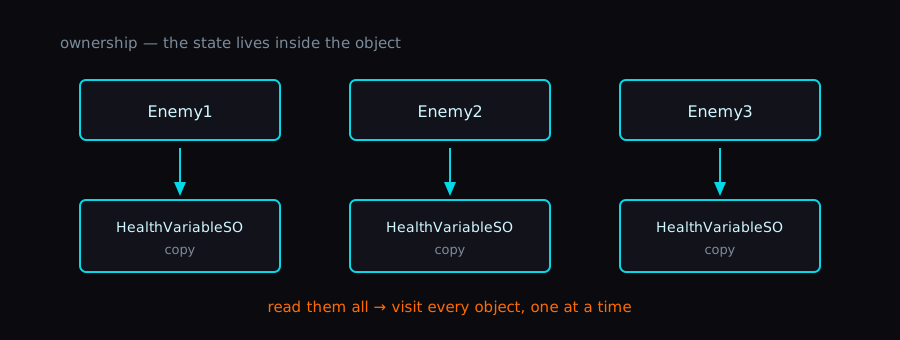
Each object “owns” its state. Intuitive, but scattered in memory.
Reactive Entity Sets use central management:
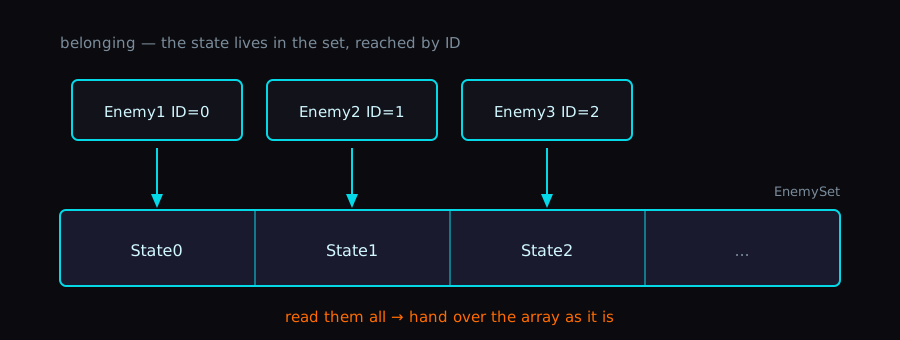
[SerializeField] private EnemyEntitySetSO enemySet;

void OnEnable()
{
    enemySet.Register(GetInstanceID(), new EnemyData { health = 100 });
}

void TakeDamage(int amount)
{
    var data = enemySet[GetInstanceID()];
    data.health -= amount;
    enemySet[GetInstanceID()] = data;  // Observers notified
}
O(1) access via Sparse Set data structure
Contiguous memory — GPU-transfer friendly, cache-friendly
Reactive — Per-entity and set-level change notifications
This is what I call the shift from “ownership” to “belonging.” The entity doesn’t own its state — it belongs to a set that manages state centrally.
Why does this matter? It seems to open optimization possibilities that Instancer cannot achieve:
| Optimization | Instancer | RES |
|---|---|---|
| GPU batch transfer | No | Yes |
| Pagination | No | Yes |
| Slice-based change detection | No | Yes |
For a deeper look at this paradigm shift, see the companion post:
PostOwnership vs Belonging as a New Paradigm for State Management in UnityReactiveEntitySet isn't a multi-instance VariableSO — it's an evolution of RuntimeSet. A look at how shifting from 'ownership' to 'belonging' changes memory layout, optimization space, and what state really means in Unity.Compared to Unity Atoms
To be clear: the core features are essentially the same.
Variables, Events, Runtime Sets — these patterns come from Ryan Hipple’s talk, and both Unity Atoms and Reactive SO seem to implement them similarly. If you’re already using Unity Atoms and it works for you, there’s no architectural reason to switch.
Unity Atoms also has debugging features — stack trace display, Inspector event raising, old/new value tracking, and replay buffers. These are solid features.
| Feature | Unity Atoms | Reactive SO |
|---|---|---|
| Variables | Yes | Yes |
| Events | Yes | Yes |
| Runtime Sets | Yes | Yes |
| Instancer | Yes | No |
| Reactive Entity Sets | No | Yes |
| GPU Sync | No | Yes |
| Stack Trace | Yes (Debug Mode) | Yes |
| Inspector Event Raise | Yes | Yes |
| Dedicated Monitor Window | No | Yes (tabbed) |
| Unity 6 Support | Slow | Yes |
Where Reactive SO differs:
- Dedicated Monitor Window — Unity Atoms integrates debugging into each asset’s Inspector, meaning you inspect assets one at a time. Reactive SO provides a single tabbed EditorWindow where you can see all events/variables/sets at a glance. When something isn’t working and you’re not sure which event or variable is involved, having everything in one window helps.
- GPU Sync — Automatic synchronization of Variables to shader globals.
- Reactive Entity Sets — A different approach to per-instance state (see From Ownership to Belonging).
What You Can Do
Decoupling
Before:
Player → HealthBar, GameManager, AudioManager, SaveSystem...After:
Player → HealthVariable ← HealthBar, GameManager, AudioManager, SaveSystem...Each component can be tested in isolation. Mock the Variable, run your tests.
Cross-Scene Communication
ScriptableObjects persist across scene loads. Your events and variables work regardless of which scene you’re in.
GPU Integration
Variables sync to shader globals. Your compute shaders can read gameplay state without manual transfer code.
Debugging — The Monitor Window
This is the main reason I built Reactive SO.
Unity Atoms has debugging features — you can enable Debug Mode to see stack traces, raise events from the Inspector, and view old/new values. But these are integrated into each asset’s Inspector. When you’re debugging and don’t know which event or variable is causing the problem, you have to click through assets one by one.
Reactive SO takes a different approach with a single dedicated Monitor window (Window > Reactive SO > Monitor), with one tab per asset type — Event Channels, Actions, Variables, Runtime Sets, Reactive Entity Sets:
- Every tab is an event log — each raise, value change, or set operation becomes a timestamped row during Play Mode
- The Event Channels tab tracks callers, so “which method fired this event” is a column instead of a stack-trace dig
- A shared search filter, a clear button, and CSV export sit above whichever tab is active
The first release actually shipped this as three separate windows. The consolidation into one tabbed window — and why — is its own story:
PostRebuilding the Reactive SO Monitor from three windows into oneI originally said Reactive SO has three dedicated Monitor windows. It doesn't anymore. Here's why I collapsed them into a single tabbed window, and the CSV export rabbit hole I fell into on the way.The difference is subtle but matters when debugging: instead of “let me find that specific event asset and check its Inspector,” you can just look at one window and see everything.
Dependency Analyzer — The Trade-off of Decoupling
Decoupling is great, but it comes with a cost: you can lose track of what depends on what.
When everything communicates through ScriptableObject assets, the question “which scenes and prefabs use this event?” becomes hard to answer. You can’t just search for direct references in code.
Reactive SO includes a Dependency Analyzer (Window > Reactive SO > Dependency Analyzer) that scans your project and shows:
- Which Scenes and Prefabs reference each Event Channel or Variable
- Unused assets — Event Channels or Variables that nothing references
- Unassigned fields — Components with Event Channel fields that are null (potential runtime errors)
- Export to Markdown, JSON, or CSV
It’s not a complete solution — you still can’t visualize event chains or see “when A fires, B reacts and fires C.” But it’s a start. Knowing which assets are unused or unassigned can catch bugs before they happen.
Wrap-up
It’s not meant to be a replacement for Unity Atoms — more of an evolution. If Unity Atoms works for you, keep using it. If you need Unity 6 support, GPU integration, or you’re curious about the “belonging” paradigm, Reactive SO might be worth exploring.
The monitor window is still the reason I open my own library every day. The architecture patterns came from Ryan Hipple; the debugging experience is the part I actually built this for.