In the introduction to Reactive SO, I wrote that the library ships three dedicated monitor windows — one for events, one for variables, one for runtime sets. I even put it in a comparison table as a headline feature.
The embarrassing part: by the time that post went live, it was already wrong. The day before, I had merged all three windows into a single tabbed one. This post is the correction, and the reasons behind it.
Unity Asset StoreReactive SO | Game ToolkitsScriptableObject-based reactive architecture for Unity. Variables, Event Channels, Runtime Sets, GPU Sync, Reactive Entity Sets, and dedicated debugging windows.Why three windows stopped making sense
The three-window layout was fine when the library had three reactive asset types. Then two more showed up on the roadmap: ActionSO (command-style assets you can execute from tooling) and ReactiveEntitySet (per-entity state in a central set). Following the existing pattern meant five separate EditorWindows.
Five windows is where the pattern breaks. The whole pitch of having monitor windows at all is “look at one place instead of clicking through assets” — and five windows is no longer one place. During a debugging session I’d have two or three of them docked, each with its own search box, each with its own clear button, each eating vertical space. The windows were also implemented as three parallel sets of collector/renderer/exporter classes that had drifted apart in small ways, and every fix had to be applied three times.
So the rebuild had one rule: one window, one toolbar, one search box, and a tab per asset type.
The shape of the unified window
The window opens from Window > Reactive SO > Monitor. The layout is a tab bar on top, then a shared toolbar, then the content area, then a status bar.
Five tabs, in this order: Event Channels, Actions, Variables, Runtime Sets, Reactive Entity Sets. The selected tab is persisted via EditorPrefs, so reopening the window after a domain reload or the next morning lands on whatever I was debugging last. Small thing, but it removes one click from every session.
The toolbar is shared across tabs: a Clear button on the left, a search field with live filtering, and a kebab menu (⋮) on the right. The status bar at the bottom shows the current tab’s log count and whether Play Mode is running.
Each tab implements one small interface, which is the seam that made the consolidation cheap:
public interface IMonitorTab
{
    string TabName { get; }
    VisualElement Content { get; }
    int LogCount { get; }
    int FilteredCount { get; }

    void Clear();
    void ApplyFilter(string searchText);
    void OnEnterPlayMode();
    void OnExitPlayMode();
    void ExportToCsv(string path, bool withBom);
    void SetMaxLogEntries(int maxEntries);
}
The window itself knows nothing about events or variables. It forwards toolbar actions to whichever tab is active and asks it for counts. Adding a sixth asset type later means writing one tab class and adding one entry to an array.
From polled values to event logs
The old Variable Monitor refreshed on a timer — it showed each variable’s current value and re-read everything every 100ms during Play Mode. That design answers “what is the value now?” but not the question I actually had while debugging, which was “what changed, when, and who did it?”
The unified tabs flipped the model. Each tab subscribes to a static hook on its asset type when Play Mode starts — the event channel tab listens to a library-wide “any event raised” hook that carries the channel, the value, and caller info; the variable tab does the same for value changes — and appends a row per occurrence. The Event Channels tab shows Time, Name, Type, Value, Listeners, and Caller columns, so “which method fired this event” is a column instead of a stack-trace dig.
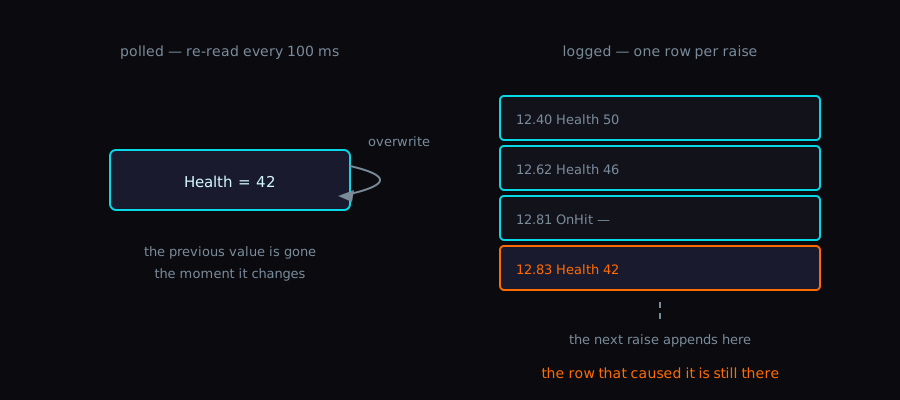
Logs instead of snapshots also means the data survives the moment. When an enemy dies for the wrong reason, the row that caused it is still in the list after the fact, sortable and searchable.
UI Toolkit details that took longer than they should have
Each tab’s list is a MultiColumnListView with sortable columns and a fixed row height of 28px. The fixed height isn’t a style choice — virtualization is what keeps the list usable when a 20 Hz event stream has been running for a few minutes, and fixed-height items are the cheap path for that.
Alternating row backgrounds came with a small gotcha. Styling the rows themselves — via Unity’s --alternative-background item class in USS — stripes only the real rows, so the empty area below the last row stays flat instead of zebra-striping to the bottom of the window. My first attempt striped the whole viewport and looked like a spreadsheet with phantom rows.
The CSV export rabbit hole
Export lives in the kebab menu, and there are two entries: Export/CSV and Export/CSV (Excel). The only difference is a single character — the Excel variant prepends a UTF-8 BOM (the bytes EF BB BF), because Excel on Windows reads a BOM-less UTF-8 CSV as the local code page and mangles every non-ASCII event name. I lost an evening to “the export is broken” before realizing the export was fine and Excel was guessing.
The escaping follows RFC 4180: fields containing commas, quotes, or newlines get wrapped in quotes, embedded quotes get doubled. Event payloads can be arbitrary strings, so this isn’t theoretical — the first multiline string value I logged broke the naive exporter immediately. The escaping logic now has its own Edit Mode tests.
The kebab menu also holds a Max Entries setting (100 / 500 / 1K / 5K / 10K, default 1K), persisted in EditorPrefs like the tab index. The cap exists because an unbounded log list and a long Play Mode session eventually add up to an editor that stutters on every event.
Things still bugging me
- Live filtering re-evaluates on every keystroke, and on a 10K-row log it’s noticeably janky. Debouncing the search field is the obvious fix I haven’t done.
- The kebab button placement looks slightly off-balance next to the search field. Pure cosmetics, bugs me anyway.
- I keep wanting a “pin asset” feature — pin one event channel to the top of the list during a hot debugging session instead of typing its name into the search box each time.
Wrap-up
The lesson I’m keeping is about the docs, not the code. The intro post stated a window count as a feature, and the count was stale within a day. Architecture descriptions age fine; UI inventories don’t. Next time the feature list says “N windows”, I’ll write what the tooling does instead of how many pieces it comes in.
One window, five tabs. I should have started there.
PostWhat is Reactive SO?An introduction to Reactive SO, a ScriptableObject-based reactive architecture for Unity. Built on Ryan Hipple's Unite Austin 2017 patterns, extended with Reactive Entity Sets, GPU Sync, and dedicated debugging windows.