I’ve been chipping away at a voxel terrain prototype where the player digs into the ground. The Marching Cubes mesher worked, the runtime carve worked, and then I tried to actually author a level and realised I had no way to do it from the Editor. Painting from Play Mode and hoping the result looked right was getting old.
This post is about the painter window I bolted onto the runtime, what hurt while building it, and the small refactor that pulled the Editor-only code out of the runtime assembly. The meshing side of this same prototype is written up separately:
PostFixing mesh holes in my Marching Cubes voxel terrainI ported a Marching Cubes voxel digger from one Unity prototype into the next and watched it grow holes whenever the player dug at an off-grid height. Here's the algorithm swap that closed them, plus the editor workflow I built to iterate on the fix.Why a window at all
Painting from Play Mode loses everything on stop. That’s the obvious failure. The less obvious one came up the moment I tried to sculpt a cave: I needed to put voxels below the visible surface, and a raycast against the mesh just gives me the topmost hit. Carving inside a hill is a different operation from carving its outside, and the click-and-drag UI needs to know which.
So I wanted a few specific things from one window. A click-drag carve and fill that survives Edit Mode. A way to anchor edits to a Y plane instead of the surface, so I can paint into a buried slice. And undo that treats one drag as one entry, not 200.
The window structure
The window owns very little state. It picks a VoxelWorld component, configures a brush, and routes every edit through one method on the runtime:
public bool SculptSphereCommand(
    BrushMode mode,
    Vector3 worldPos,
    float radius,
    float noiseStrength,
    float noiseScale,
    int noiseSeed)
The Editor side never touches the density buffer directly. That constraint pays off once Undo and persistence enter the picture: there’s one place where edits happen, so there’s one place that can SetDirty and reload from the asset.
The on-disk format is a ScriptableObject named VoxelWorldData: dimensions, chunk size, a flat float32 density buffer stored as byte[], plus a version field for migrations later. VoxelWorldDataSerializer is the only thing that reads or writes it.
Stroke-level Undo
Per-voxel Undo was the first thing I tried, and it was unusable. A single drag is a lot of sphere stamps, so a single Ctrl+Z erased the last touch, not the last stroke. After half a minute of painting I’d given up on Undo entirely and was reloading from the asset instead.
The fix is the standard Unity pattern but it took me a while to wire correctly. Open an undo group on mouse-down, register the asset once for that group, accumulate edits while the mouse is held, then collapse on mouse-up:
private void BeginStroke()
{
    strokeOpen = true;
    strokeHadChanges = false;
    strokeSeed = noiseSeed ^ Random.Range(int.MinValue, int.MaxValue);
    Undo.IncrementCurrentGroup();
    Undo.SetCurrentGroupName("Voxel Stroke");
    strokeUndoGroup = Undo.GetCurrentGroup();
    Undo.RegisterCompleteObjectUndo(targetWorld.WorldDataAsset, "Voxel Stroke");
}

private void EndStroke()
{
    if (!strokeOpen) return;
    strokeOpen = false;
    if (targetWorld != null && strokeHadChanges)
    {
        targetWorld.SaveToAsset();
    }
    Undo.CollapseUndoOperations(strokeUndoGroup);
}
Two details I wish I’d known earlier. First, RegisterCompleteObjectUndo on the data asset was what I needed here, not RecordObject. The density buffer is a byte[] field on the asset, and in my testing RecordObject didn’t deep-copy it, so Undo restored the same array reference and nothing actually rolled back. Second, after Undo fires, the runtime model is stale, so I had to subscribe to Undo.undoRedoPerformed and call ReloadFromAsset to rebuild the chunks.
The mid-stroke noise seed is XORed with a random value so each stroke gets its own pattern, instead of every stroke producing the same irregularity at the same world position.
Y-plane editing for buried layers
The surface raycast worked fine for me when sculpting outside. For carving a corridor at Y = 12, it was hopeless: I’d have to chip the ceiling off first to expose the layer I actually wanted.
So the brush has two anchor modes. In Surface mode the hit comes from Physics.Raycast against the voxel mesh. In YPlane mode the hit comes from intersecting the camera ray with a horizontal plane at the configured Y:
if (brushAnchorMode == BrushAnchorMode.YPlane)
{
    Ray ray = HandleUtility.GUIPointToWorldRay(mousePosition);
    float effectivePlaneY = GetEffectivePlaneY();
    Vector3 planePoint = targetWorld.transform.TransformPoint(new Vector3(0f, effectivePlaneY, 0f));
    Plane plane = new Plane(Vector3.up, planePoint);
    if (plane.Raycast(ray, out float enter))
    {
        worldHit = ray.GetPoint(enter);
        surfaceNormal = Vector3.up;
        return true;
    }
    ...
}
A Handles.DrawSolidRectangleWithOutline call draws the active plane in the Scene view with a Y = 12.00 label, so I can see where I’m about to paint before clicking. There’s also a “Snap to layer spacing” toggle that rounds the plane to multiples of the reference-layer interval, which makes it trivial to stack edits on aligned slices.
Layer gizmos — from hardcoded to generated
The first version of this had six hardcoded reference layers with literal names. I’d written them out manually because I knew the world height at the time. Two weeks later I bumped the world height, the gizmos stopped lining up with anything meaningful, and I had to remember which file the magic constants lived in.
The replacement is dumb in a good way. Given a voxel extent and a spacing in voxels, compute how many planes fit, and place them at multiples of the spacing:
public static int LayerCount(int extent, int spacing)
{
    if (extent < 0) return 0;
    if (spacing < 1) return 0;
    return extent / spacing + 1;
}

public static int LayerY(int index, int spacing)
{
    if (index < 0) return 0;
    if (spacing < 1) return 0;
    return index * spacing;
}
The layout helper is a static class with no Unity dependencies, so the tests for it run in the Editor test runner with no fixture setup. Every behaviour I cared about (negative inputs, zero spacing, the count growing with extent) is one [TestCase] line.
Per-layer hide overrides are a bool[] indexed by layer index. Element N hides layer N if true; missing or out-of-range indices stay visible. Missing was the important case: I didn’t want adding height to the world to suddenly hide layers because the override array was the old length.
Pulling Gizmos out of the runtime assembly
The original Gizmo code lived in the runtime assembly because that was convenient. OnDrawGizmos is an instance method, so the obvious place to put it is on the runtime component. Convenient and wrong: UnityEditor references leak into runtime builds, and every settings-related class has to be wrapped in #if UNITY_EDITOR.
The cleaner version uses [DrawGizmo], which lets a static method in an Editor-only assembly draw Gizmos for a runtime type without the runtime ever knowing about it:
[DrawGizmo(GizmoType.NonSelected | GizmoType.Selected)]
private static void DrawLayerGizmos(VoxelWorld target, GizmoType gizmoType)
{
    if (target == null) return;
    VoxelLayerGizmoSettings settings = VoxelLayerGizmoSettings.instance;
    if (!settings.ShowLayerGizmos) return;
    ...
}
Settings live in a ScriptableSingleton<T> with a FilePath under ProjectSettings/:
[FilePath("ProjectSettings/VoxelLayerGizmoSettings.asset",
    FilePathAttribute.Location.ProjectFolder)]
internal sealed class VoxelLayerGizmoSettings : ScriptableSingleton<VoxelLayerGizmoSettings>
{
    [SerializeField] private bool showLayerGizmos = true;
    [Min(1)]
    [SerializeField] private int layerGizmoSpacing = 1;
    [SerializeField] private Color layerGizmoColor = new(0.55f, 0.55f, 0.85f, 0.25f);
    [SerializeField] private bool[] layerGizmoHidden = System.Array.Empty<bool>();
    ...
}
The values version-control with the project (the asset is text under ProjectSettings/), they never end up in a runtime build because the assembly is Editor-only, and a single SerializedObject against the singleton drives the entire settings UI inside the painter window. There’s no separate Project Settings provider page; the toggles live next to the brush controls where I actually need them.
Versioned data, with an honest footnote
The data asset carries a version field and VoxelWorldDataSerializer is the dispatch point. Today there’s exactly one real format: CurrentVersion = 1, density-only float32 flat buffer.
There’s a small wart I want to be honest about. An earlier OnValidate auto-bumped the version to 2 on a field touch, even though the payload was still density-only. That code is gone, but I have assets on disk stamped with version 2. The serializer reads version 2 as version 1 and the next write normalises it back to 1:
switch (asset.Version)
{
    case 1:
    // Version 2 was written by a now-removed OnValidate that auto-bumped the version
    // even though the payload was still density-only. Treat it as v1 on read; the next
    // save via Write will normalise it to CurrentVersion (1).
    case 2:
        DensityFieldCodec.Decode(asset.DensityField, density);
        break;
    default:
        throw new NotSupportedException(
            $"Unsupported VoxelWorldData version: {asset.Version}");
}
A material-ID channel is reserved for the real v2, and Write already throws NotSupportedException if I pass material IDs today. I’m not claiming this is a sophisticated migration. It’s just that the version dispatch is centralised in one file, so when I actually do change the format there’s a single switch for me to extend.
The serializer has Edit Mode tests covering round-trip, the empty-asset-fills-solid case, and the unsupported-version error path. Cheap to run, and they caught two regressions while I was reshaping the API.
Multi-chunk edits without seam corruption
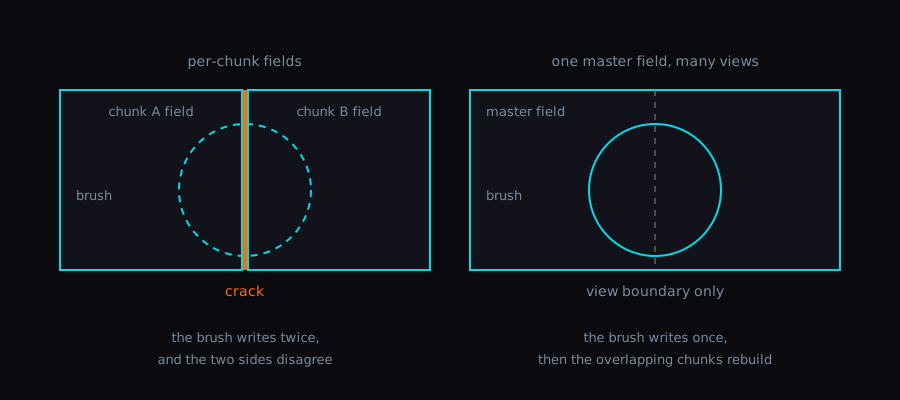
Edits don’t write to chunks directly. The brush stamps into a single master density field that spans the whole world, then the model computes which chunks overlap the dirty bounds and rebuilds only those:
BoundsInt dirtyBounds = VoxelBrush.StampWithBounds(
    model.MasterField, mode,
    local.x, local.y, local.z,
    radius, noiseStrength, noiseScale, noiseSeed);

IReadOnlyList<Int3> dirtyChunks = model.ApplyBoundsEdit(dirtyBounds);
return RebuildDirtyChunks(dirtyChunks);
Going through one master field is what fixes the seams. When I had per-chunk fields earlier, a brush straddling a chunk boundary wrote slightly different values either side and the Marching Cubes mesher produced visible cracks. One field, multiple views, no cracks.
The runtime also has LOD support for distant chunks via a separate LodField / LodSmoothing path, but the editor window doesn’t touch any of it. It just stamps and asks the world to rebuild. The LOD code is a runtime-only concern; the painter only needs to know about the master field.
What I’d still change
Brush preview is a Handles.SphereHandleCap plus two Handles.DrawWireDisc rings at the raycast hit (one along the surface normal, one along world up). That shows me where the stamp centre will land, but it doesn’t show the noise-jittered footprint, so a high-strength noise setting can carve a little outside the visible sphere. I’d like the preview to sample the same ValueNoise3D function the stamp uses and draw the actual affected cells. Haven’t done it yet.
I also still have a single combined “Reset World (Fill Solid)” button right next to the save and reload buttons. I’ve hit it by accident exactly once, and that was enough.
Wrap-up
The thing this window really fixed for me is the loop. Before: Play, sculpt, lose it, repeat. After: a Scene-view drag becomes a single Undoable change against an asset I can commit. I’d read the usual advice about keeping Editor code out of the runtime assembly and routing UI through a single model method, but doing it the wrong way first and then the right way is what made me actually understand the difference for this prototype.
The two bits I leaned on hardest were [DrawGizmo] for the Editor-only visualisation and ScriptableSingleton<T> with a ProjectSettings/ FilePath for the settings. They keep the runtime assembly free of UnityEditor, which I noticed the next time I built a player and there were zero compile errors to fix.
The painter window is the part of this prototype I reach for most often now. That’s a clearer signal than any other tooling I’ve built on this project, and probably the one to copy the shape of next time.
The companion post on the meshing side of this same prototype is here:
PostFixing mesh holes in my Marching Cubes voxel terrainI ported a Marching Cubes voxel digger from one Unity prototype into the next and watched it grow holes whenever the player dug at an off-grid height. Here's the algorithm swap that closed them, plus the editor workflow I built to iterate on the fix.