The audio side of my action prototype was the messiest part of the project for about a year. AudioSource components dropped onto random prefabs, AudioManager.PlaySound("hit") calls leaking into gameplay scripts, a settings UI that knew far too much about the mixer. I pulled the audio code out into its own package and split it into three layers, and that’s the post.
This piece sits directly on top of the Reactive SO series. The package leans on EventChannelSO and FloatVariableSO to the point that the architecture doesn’t make sense without that background, so if you haven’t read the intro, start there:
What I was trying to avoid
The pains that drove the rewrite were boring and specific:
- Gameplay code holding a reference to an
AudioManagersingleton and callingPlaySound AudioSourceGameObjects scattered across prefabs, each with its own pitch and volume sliders- Settings UI that talks to
AudioMixerdirectly - Tests that can’t run because every audio path eventually touches a real
AudioSource
Reactive SO patterns already solved most of this for non-audio state. Audio is the same problem with an extra step: between “I want to play this” and “an AudioSource is now playing,” there’s a pool, per-play randomization, attenuation, and a mixer.
The three layers
Cue, Request, Service. The names are boring on purpose.
AudioCueSOis data. A ScriptableObject describing one playable sound (clip list, playback mode, loop flag).AudioPlayRequestis intent. A readonly struct (“play this cue with this config at this position”) that travels through anEventChannelSO.AudioPlaybackServiceCoreis playback. A plain C# class that owns the pool, picks a clip, applies randomization, and routes aSoundEmitterthrough the mixer.
flowchart LR
    Gameplay[Gameplay code] -->|raise| Channel[(AudioPlayRequestEventChannelSO)]
    Channel -->|AudioPlayRequest| Service[IAudioPlaybackService]
    Cue[(AudioCueSO)] -->|data| Service
    Config[(AudioConfigurationSO)] -->|attenuation| Service
    Service -->|borrow / return| Pool[SoundEmitter pool]
    Pool --> Emitter[SoundEmitter]
    Volume[(FloatVariableSO)] -->|dB| Mixer[AudioMixer]
The arrows that matter: gameplay only writes to the channel, and settings UI only writes to a FloatVariableSO. Nothing in the gameplay layer holds a reference to the service or the mixer.
Layer 1 — Cue (data)
AudioCueSO is the what. One asset per logical sound (footstep on grass, hit-confirm, UI confirm), with the fields you’d otherwise scatter across AudioSource components in prefabs:
- One or more
AudioClips - A
PlaybackMode(Sequential, Random, or Shuffled) plus arecentWindowSizefor repeat avoidance in Random mode - An
isLoopingflag for continuous sources like music boxes
AudioConfigurationSO is a separate asset that lives at project scope: mixer group, volume range, pitch range, priority, spatial blend, doppler level, rolloff mode, min/max distance, and a custom rolloff curve. The cue does not reference one. The request carries the cue and the config side by side, so the same “footstep on grass” cue can play through a “world SFX” config in gameplay and a “preview” config in an editor tool without duplicating the clip list.
Layer 2 — Request (intent)
AudioPlayRequest is a readonly struct carrying a cue, a config, a world position, an optional attach-to Transform, and per-call pitch and volume multipliers. The gameplay code’s entire interaction with audio is to construct one of these and raise it on an AudioPlayRequestEventChannelSO, which is a typed EventChannelSO<AudioPlayRequest> from the Reactive SO package.
The channel is the seam. Anyone can raise a request without holding a reference to the playback service, and a test can subscribe to the same channel to assert “this gameplay action caused this request” without ever instantiating an AudioSource.
For lifetime control, Play returns an AudioCueHandle. Fire-and-forget one-shots ignore it. Long-running plays keep the handle so they can call Stop(handle) for an immediate cut, or Finish(handle) to let a non-looped clip play to its natural end before the slot is reclaimed. That distinction took me longer to land on than I’d like to admit. The first version treated everything as fire-and-forget, and I had no way to stop a looped wind sound when the player left the area.
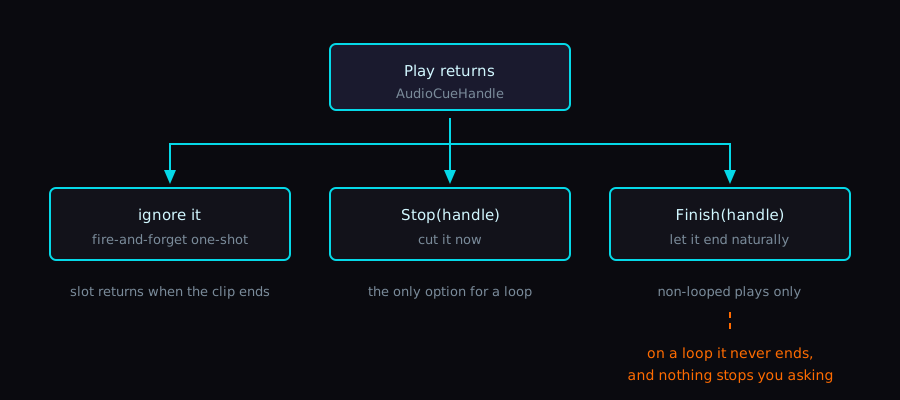
One footgun worth flagging: Finish only makes sense for non-looped plays. A looped emitter never reaches a natural end (the AudioSource.loop flag stays on), so for loops you have to call Stop. The package doesn’t currently guard against Finish-on-loop, and I should probably fix that.
Layer 3 — Service (playback)
IAudioPlaybackService is the contract. AudioPlaybackServiceCore is the pure-C# implementation, and AudioManager is the MonoBehaviour that wires the channel to the service. The pool itself is hosted by SoundEmitterPoolMB, which spawns the SoundEmitter GameObjects under itself at Awake.
Inside the core:
AudioClipSelectorpicks one clip from a cue. Selection state is a separateAudioClipSelectorStatestruct kept per-cue inside the service, so recent picks survive across calls and the same clip doesn’t repeat back-to-back in Random modeAudioRandomizerrolls per-play volume and pitch inside the configuration’sVector2ranges, then the service multiplies in the request’sVolumeMultiplierandPitchMultiplierSoundEmitterPool(pure C#) andSoundEmitterPoolMB(itsMonoBehaviourhost) hand out and reclaimSoundEmitters, which are thin wrappers aroundAudioSource. The pool tracks per-slot generations: a staleAudioCueHandlewhose slot has been recycled failspool.IsValidinstead of stopping someone else’s sound
The pool is the only thing in the system that owns AudioSource GameObjects. Gameplay code can’t accidentally leak one because there’s no API for getting at one.
The mixer-volume seam
The mixer side is where this architecture meets the Reactive SO series most directly. A settings UI usually wants to slide a “BGM volume” fader and have the mixer respond. The classic version of that is the UI script calling AudioMixer.SetFloat directly.
In this package, the settings UI writes to a FloatVariableSO and raises a paired FloatEventChannelSO. A small binder component (AudioMixerVolumeBinder) subscribes to the channel and applies the value:
private void ApplyVolume(float value)
{
    if (mixer == null || string.IsNullOrEmpty(parameterName)) return;

    float clampedValue = Mathf.Clamp(value, 0.0001f, 1f);
    mixer.SetFloat(parameterName, Mathf.Log10(clampedValue) * 20f);
}
0.0001 is there to keep Log10 away from negative infinity at the bottom of the slider, and * 20f is the linear-to-dB conversion I copied off the first mixer slider tutorial I followed years ago. It’s stuck around because it sounds right to my ear on my own slider.
The settings UI never imports UnityEngine.Audio. It writes to a number. If I swap in a different audio backend later, the UI doesn’t change.
One thing I had to learn the hard way: the binder subscribes to the channel, not to FloatVariableSO.OnValueChanged. Subscribing to the variable directly works, but it locks the binder to a FloatVariableSO forever, which kills the option of swapping in (say) an IntVariableSO with a 0–100 percent scale later. In my own setup, whoever writes the variable also raises the channel in the same frame. I keep a one-liner note about it in the package’s readme so I don’t forget when I come back to this code in three months.
The other thing I learned the hard way — initial apply belongs in Start, not OnEnable
The natural place to also seed the mixer with the current variable value is right next to the subscription, inside OnEnable. That’s what I did first, and it worked fine in the Editor for months. Then I shipped a macOS Standalone build and every sound routed through the mixer was silent. Footsteps, hits, everything that lived under the SFX group.
AudioMixer.SetFloat’s scripting docs bury the cause in one sentence:
Don’t call
AudioMixer.SetFloatinMonoBehaviour.Awake,MonoBehaviour.OnEnable, orRuntimeInitializeLoadType.AfterSceneLoadas it can result in unexpected behavior. Instead, callSetFloatinMonoBehaviour.Startor any event function Unity calls afterwards.
What that means concretely on macOS Standalone: the call disconnects the exposed parameter from the snapshot, then silently fails to write the value, and the parameter sticks at its uninitialized -80 dB. The Editor masks this because domain reload warms the mixer before Play, so the same SetFloat happens to work and you never see the bug until you build.
The shape that survives the build splits subscription from initial apply:
private void OnEnable()
{
    if (onVolumeChanged != null)
        onVolumeChanged.OnEventRaised += ApplyVolume;
}

private void OnDisable()
{
    if (onVolumeChanged != null)
        onVolumeChanged.OnEventRaised -= ApplyVolume;
}

// SetFloat in Awake/OnEnable can silently fail in built players, leaving
// exposed parameters disconnected at -80 dB. Initial apply belongs in Start.
private void Start()
{
    ApplyVolume(volumeVariable?.Value ?? 1f);
}
If you wire a save-system that pushes the loaded value into the variable later, that path goes through the channel and works as soon as the binder’s OnEnable has subscribed — so the only thing that has to wait for Start is the very first apply.
What I can put under Edit Mode tests
The reason the service is a plain C# class and not a MonoBehaviour is testability. The package has Edit Mode tests covering:
AudioClipSelectorTest— Sequential mode returns clips in order and wraps around, Random mode respects the recent window and copes with single-clip cues, Shuffled mode visits every clip before repeating, and a “first pick isn’t biased toward index 0” guard for the initial stateAudioConfigurationSOTest—Apply(AudioSource)writes the rolloff mode, min distance, and max distance through to the source, and the defaults land at Logarithmic / 1 / 500AudioRandomizerTest—RandomizeVolumeandRandomizePitchstay inside the configuredVector2range across 100 rolls, and a degenerate range where min equals max returns that exact valueSoundEmitterPoolTest—TryGetreturns a free slot until capacity is exhausted,Returnreleases the slot and bumps the generation,IsValidrejects stale handles after a return, an untouched slot is never considered valid, and a double-return path still bumps generation exactly once perReturn
Anything that needs a real AudioSource to make a sound stays out of Edit Mode. I draw the line at my own bookkeeping; the actual DSP I leave to Unity and trust my ears in Play Mode.
Why three layers instead of two
I went back and forth on whether Cue and Request needed to be separate. They could collapse: a “play this cue at this position” call could just take an AudioCueSO and a Vector3 directly. Two reasons I kept them apart:
- A request can carry per-call overrides (volume multiplier, pitch multiplier, an attached
Transformfor moving sources) without polluting the cue asset - The EventChannel only makes sense if there’s something concrete to put on it, and a struct is much friendlier on the channel than a method call with five arguments
The trade-off is one more concept to explain in the readme. For a solo project that’s a fair price.
What the gameplay side looks like
From a Footstep component’s perspective, playing a sound is one channel raise:
[SerializeField] private AudioPlayRequestEventChannelSO playChannel;
[SerializeField] private AudioCueSO grassFootstep;
[SerializeField] private AudioConfigurationSO worldSfxConfig;

void OnFootDown(Vector3 position)
{
    playChannel.RaiseEvent(new AudioPlayRequest(
        cue: grassFootstep,
        config: worldSfxConfig,
        worldPosition: position));
}
The Footstep script holds none of the usual audio plumbing — no source, manager, mixer, or playback service reference. Only the Reactive SO channel type and two data assets sit in its serialized fields.
What I’d still change
A few honest gaps:
- The
AudioCueHandleAPI only exposes hardStopand natural-endFinish. There’s no fade-out primitive yet, so “duck this loop out over 0.5s” has to be composed at the call site by ramping the request’s volume multiplier on a coroutine and then callingStop. A first-class fade is the next thing on my list. Finishon a looped cue currently hangs the slot, since loopedAudioSources never reach a natural end. I want to either guard against it or redefineFinishfor the loop case.- 3D positional audio works via
AttachToTransform, and the emitter auto-stops when the attached transform is destroyed (theUpdateloop watches for pseudo-null). I haven’t stress-tested it on a swarm of moving emitters like a busy street. - There’s no ducking yet. The mixer setup leaves the door open for it via a second
FloatVariableSObinding, but I haven’t wired a duck-on-VO-playing path.
Wrap-up
I’m not extracting this into a public package until the handle API stabilizes (specifically, the Finish-on-loop hole). The Reactive SO core is published on the Asset Store; the audio layer is still living in the project it grew up in.
The audio layer is finally one of the parts of my project I don’t dread opening. I’ll keep pushing on the handle API and revisit this post once it settles.